

Copilot Chat & Microsoft 365 Copilot
Microsoft Copilot is an AI-powered assistant designed to help you be more productive and creative across work and life—whether you’re writing, coding, designing, or learning. It integrates with various applications and tools to provide intelligent suggestions, automate tasks, and answer questions in real time.
At UNCG, Copilot Chat is available as a free chat tool and Microsoft 365 Copilot is a premium add-on for faculty, staff, and eligible graduate students, with strict protections in place to keep your information secure.
On this page:

How to Access
Copilot Chat (Free)
- Works on any desktop or mobile browser
- Go to copilot.microsoft.com and
- Sign in with your UNCG credentials
Microsoft 365 Copilot (Paid)
- Integrated with M365 apps (Word, Excel, Outlook, etc.)
- Requires a paid Microsoft 365 Copilot license (available only to faculty, staff, and eligible graduate students at UNCG)
Downloads
Free Access Options
All of the options below connect to Copilot Chat, the free version of Microsoft Copilot available to anyone with UNCG credentials. Once downloaded, sign in with your UNCG account to begin.
- Copilot for desktop. Installs the Copilot Chat desktop app (same experience as copilot.microsoft.com).
- Microsoft Copilot for mobile (Google Play | iOS). Use Copilot Chat on your mobile device.
- Microsoft Edge with Copilot Built In. Use Microsoft’s Edge browser which includes access to Copilot Chat in the browser sidebar.
Guides/Tutorials
- Microsoft 365 Copilot at UNCG – Overview
- Frequently Asked Questions About Microsoft 365 Copilot at UNCG
- Security and Compliance Considerations for Microsoft 365 Copilot, Copilot Chat, and AI Tools
- Training and Support Resources for Microsoft 365 Copilot
- UNCG’s AI Training Portal
- Microsoft’s Get started with Microsoft 365 Copilot Learning Path (3 modules | 1 hr 30 min)
FAQ
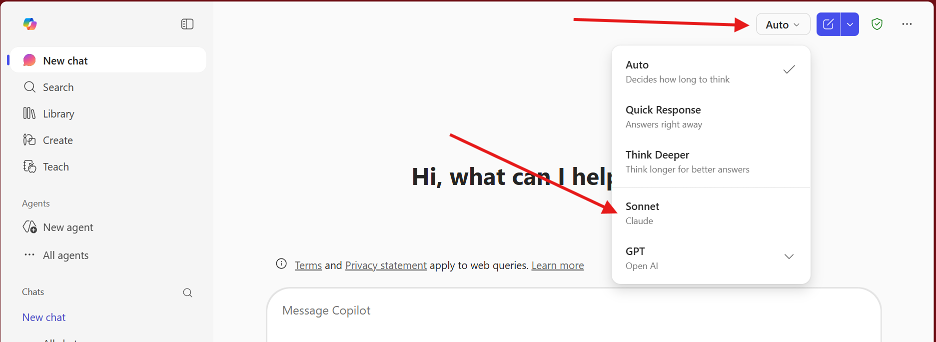
Anthropic AI models are now available in both the standard Copilot experience and Microsoft 365 Copilot. The model can be enabled under “New chat” and “Researcher”.
To enable for New Chat:
- Click the Auto model selector in Copilot.
- Select Sonnet to use the Claude model.
To enable for Researcher:
- Open Microsoft 365 Copilot (paid version)

- Click Researcher
- Click the Auto model selector.
- Select Claude.
For more information read:
Instructor Training
Explore the foundation AI concepts, instructional resources, and upskilling courses through UNCG’s AI Training portal.
Group, one-on-one, or virtual sessions are available to faculty on workshops.uncg.edu. If you cannot find what you’re looking you can request training.
Technical Support
ITS 6-TECH Service Desk
1400 Spring Garden Street Greensboro, NC 27412
Email: 6-TECH@uncg.edu
Technical Support: (336) 256-TECH (8324)
VENDOR Support Documentation
Getting started with Microsoft 365 Copilot
Privacy and Accessibility
Last Updated: October 16, 2025